
On this page
WeChat Pay is the other app you can pay with in China, next to Alipay. You can link a foreign bank card without a Chinese bank account. This guide shows how I added my own Visa card to WeChat on my phone: the exact path from the Me tab to Bank Cards, what to type, and the screen that tells you it worked.
The screenshots are from my own phone. I have hidden my card number, the last four digits, my photo, my name, my WeChat ID and my wallet balance. Checked on 30 October 2026. If you also want Alipay, see how to add a foreign card to Alipay, or read which one I used for what.
Quick answers
How do I add a foreign card to WeChat Pay?
Open WeChat, tap Me, then Pay and Services, then Wallet, then Bank Cards, then Add a Bank Card. Type the card number, choose the valid date, type the CVV code, tap Agree and Add, and look for Added.
Do I need a Chinese bank account for WeChat Pay?
No. I added my own Visa card with its number, valid date and CVV code. Do the setup before you fly, because WeChat can ask for extra checks.
Where is Bank Cards in WeChat?
Me, then Pay and Services, then Wallet, then Bank Cards. The names on your phone may differ a little between versions and languages.
Is there a fee for paying with a foreign card on WeChat?
I do not give a fee here because I did not test a payment for this guide. Tencent announced in May 2026 that new accounts get a period without foreign card fees; read the foreign card question in the FAQ for the details and check that it still applies. Your own bank may add a fee.
Which should I set up, Alipay or WeChat Pay?
I would set up both before you fly, and carry cash and a second card. Some places take only one of them. The Alipay steps are in how to add a foreign card to Alipay.
Why is the Agree and Add button greyed out?
In my screenshot it was greyed because the Valid Date and CVV Code were still empty. It looks like it only turns on once every field is filled in. This is what I saw, not an official explanation.
Why will my foreign card not add? (suggestions, not tested)
I did not get an error when I added my own card, so these are things to try, not fixes I verified. Check every digit of the number, choose the correct valid date and type the CVV code from the back of the card. Check that the Card Type shown matches your card.
Will WeChat ask for a verification code or my passport?
I was not asked for either during the steps in this guide. The app may ask for extra checks in other cases, so follow what your own screen says, and do the setup at home before you fly.
Does adding the card mean payments will definitely work?
No. Adding a card only shows the app accepted it. A real shop payment is the only proof, so carry some cash and a second card for your first days in China. See the foreign card question in the FAQ.
The 7 steps, in order
- 1
Open the Me tab and tap Pay and Services
In WeChat, tap Me in the bottom right corner. At the top of the list is Pay and Services. Tap it. I have hidden my profile photo, name and WeChat ID in the screenshot.
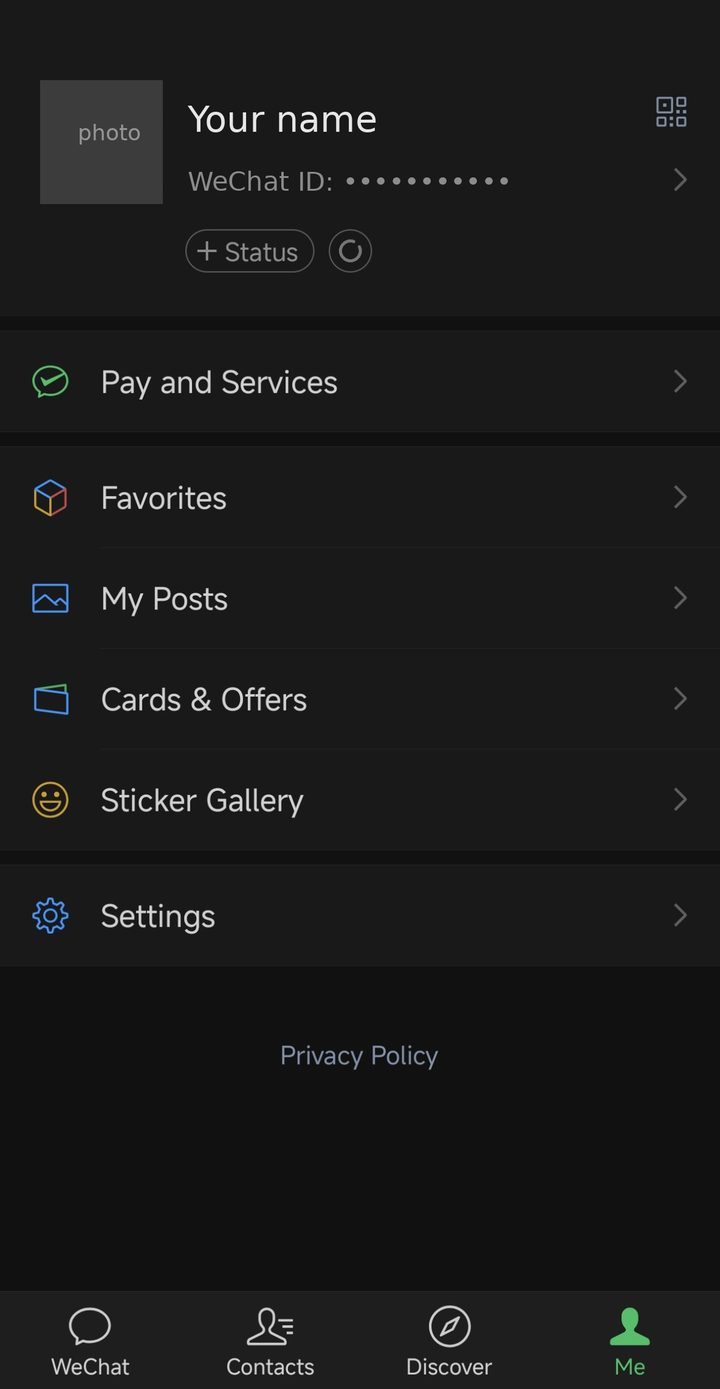
The Me tab. Tap Pay and Services. Screenshots from my own phone, with my personal details hidden. Tap a picture to open it larger.
- 2
Tap Wallet
The Pay and Services page has two big green buttons at the top: Money and Wallet. Tap Wallet. Below them are the other services, such as DiDi Ride-Hailing and Rail & Flights, which you can look at later.
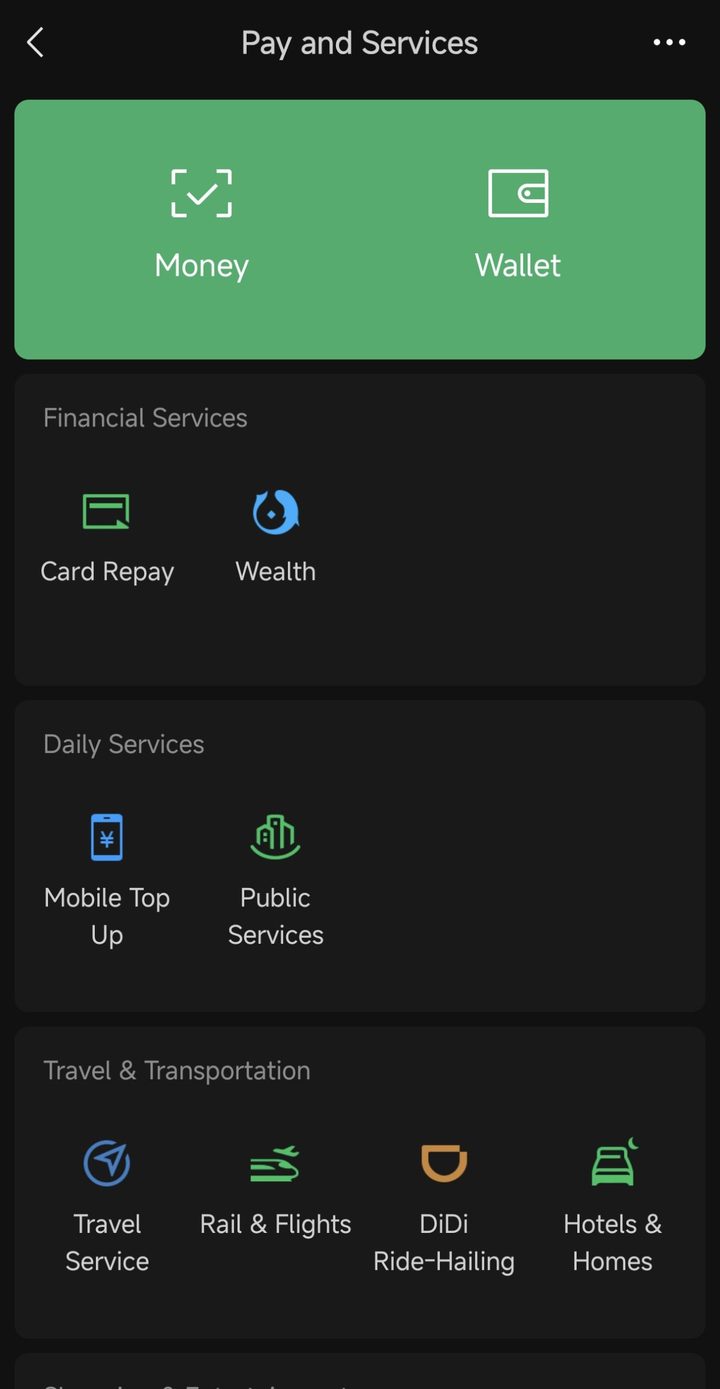
Pay and Services. Tap Wallet. Screenshots from my own phone, with my personal details hidden. Tap a picture to open it larger.
- 3
Tap Bank Cards
The Wallet page lists Balance, Bank Cards, Relative Cards, Weixin Pay Score, Payment Settings, ID Info and the Customer Service Center. Tap Bank Cards.
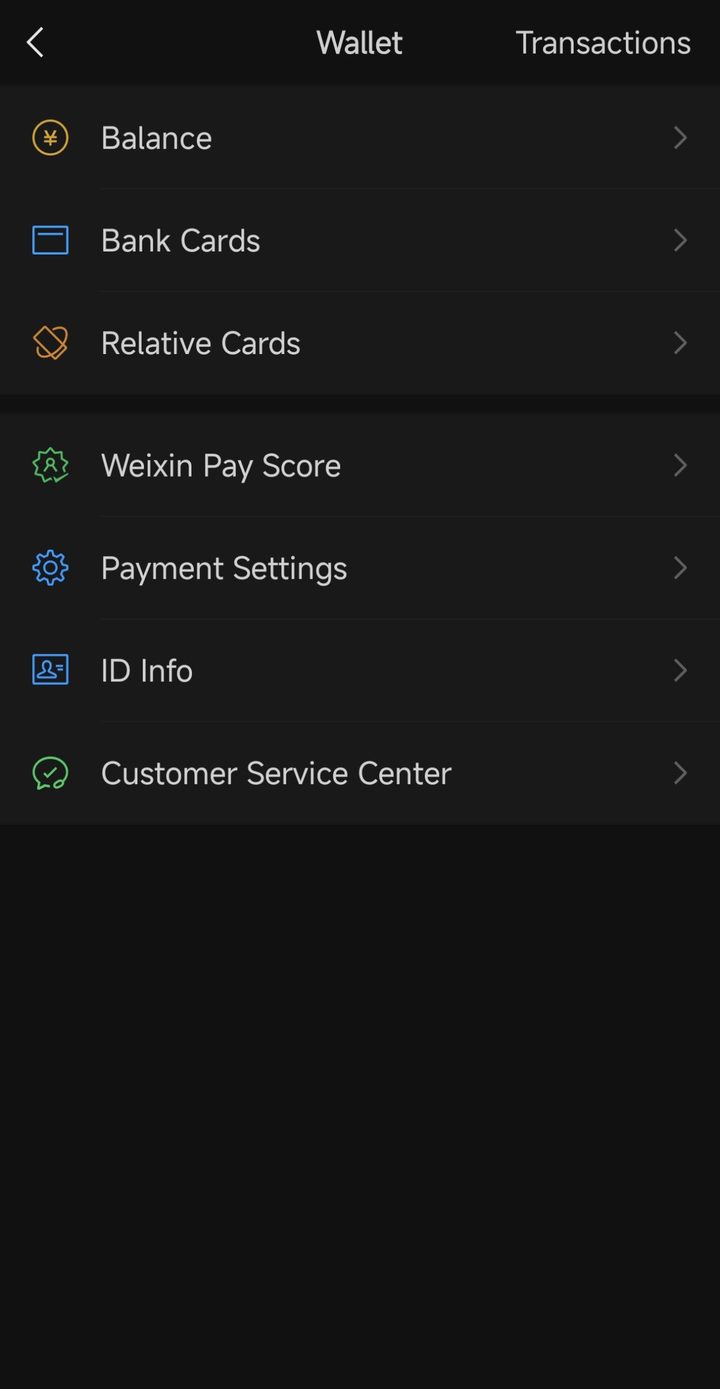
In the Wallet, tap Bank Cards. Screenshots from my own phone, with my personal details hidden. Tap a picture to open it larger.
- 4
Tap Add a Bank Card
My Bank Cards page already showed one Visa card. Under it is an Add a Bank Card row, and under that a promotion for a UnionPay Tour Card. The page says Provided by Tenpay, which is the company behind WeChat Pay. Tap Add a Bank Card.
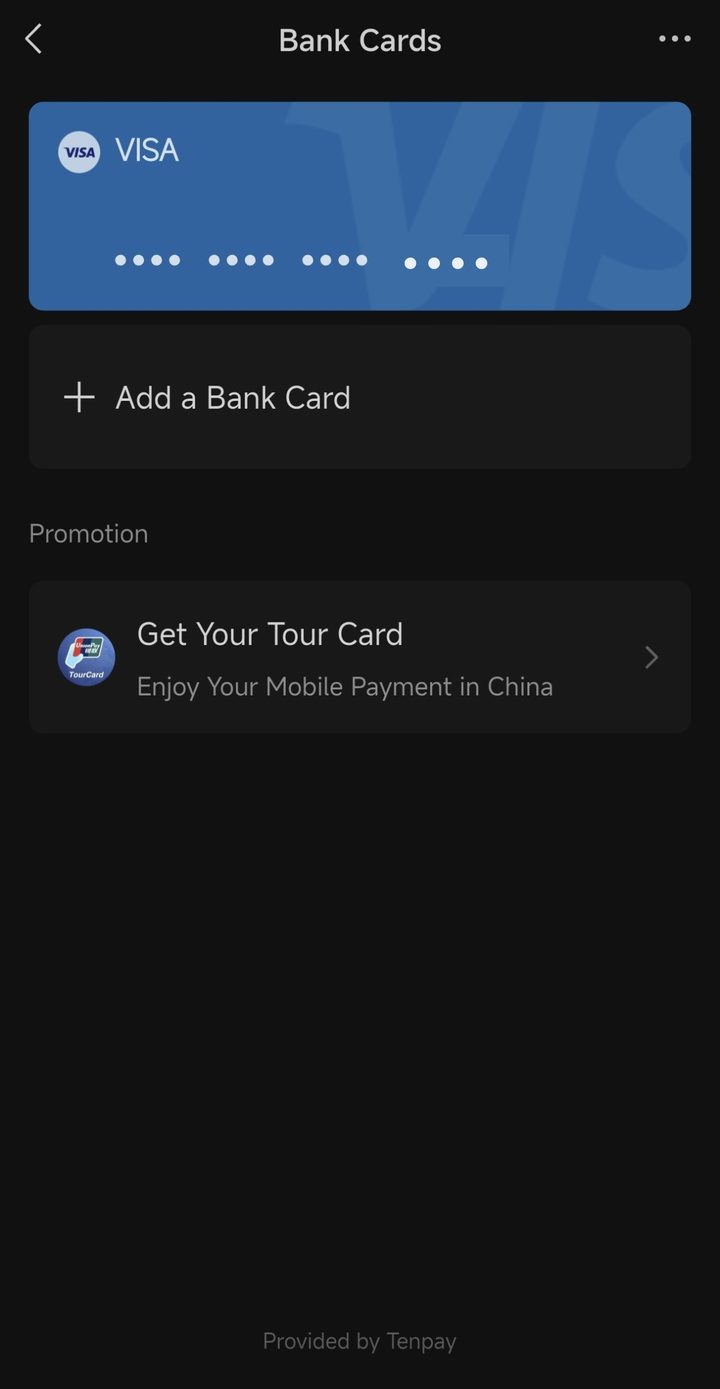
Bank Cards, before: one Visa card. Tap Add a Bank Card. Screenshots from my own phone, with my personal details hidden. Tap a picture to open it larger.
- 5
Type the card number, then the valid date and CVV code
Type the card number at the top. The Card Type filled in by itself as VISA. Then choose the Valid Date and type the CVV Code, the 3 or 4 digit security code on the back of the card. In my screenshot those two fields are still empty, and the Agree and Add button is greyed out: it only turns on when everything is filled in. The screen says consent is required to the Terms of Service, so read them first, with a translate app if they are in Chinese. I have hidden my card number.
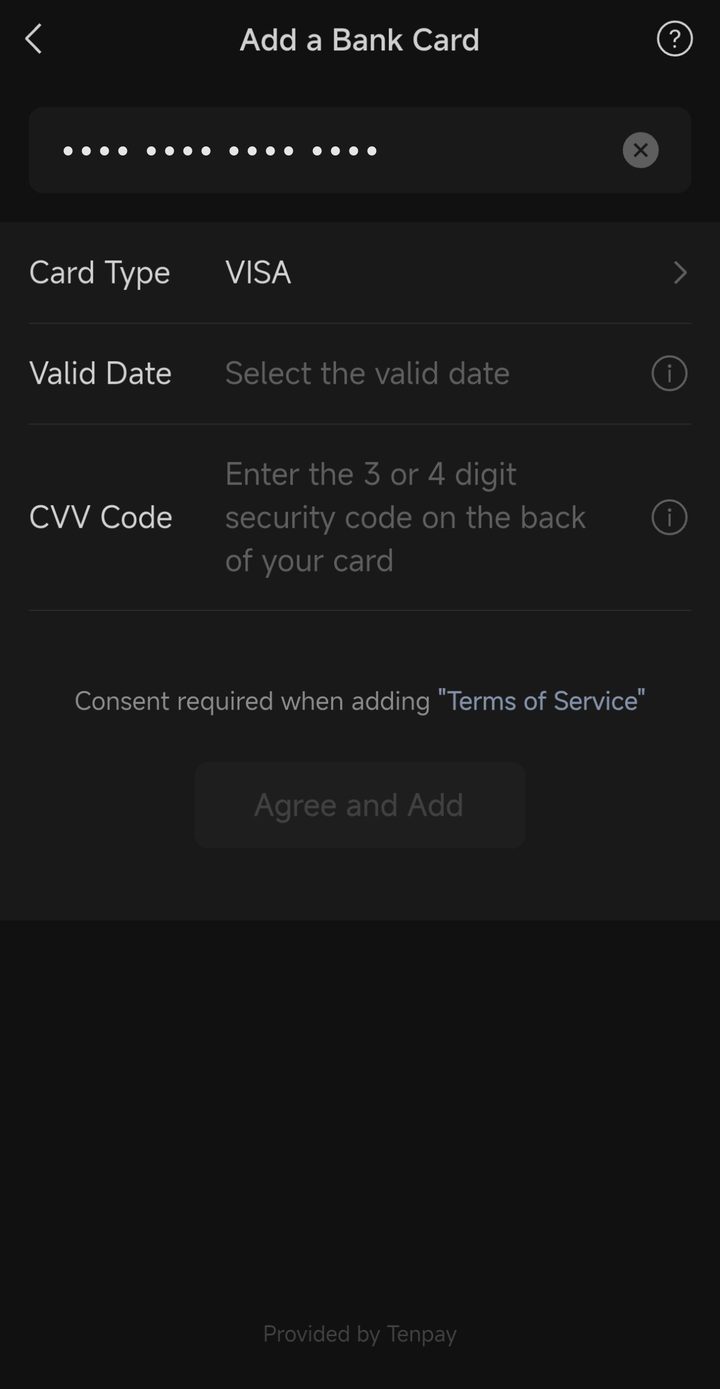
Card number hidden. Fill in the valid date and CVV code, then Agree and Add. Screenshots from my own phone, with my personal details hidden. Tap a picture to open it larger.
- 6
Tap Agree and Add, then Done
Tap Agree and Add. When it works you get a green tick and the word Added. Tap Done.

Added. Tap Done. Screenshots from my own phone, with my personal details hidden. Tap a picture to open it larger.
- 7
Check the new card is listed
Back on the Bank Cards page there were now two Visa cards, the new one under the first. Your card is ready to pay with. A real shop payment is the only proof it works, so carry cash and a second card for your first days.
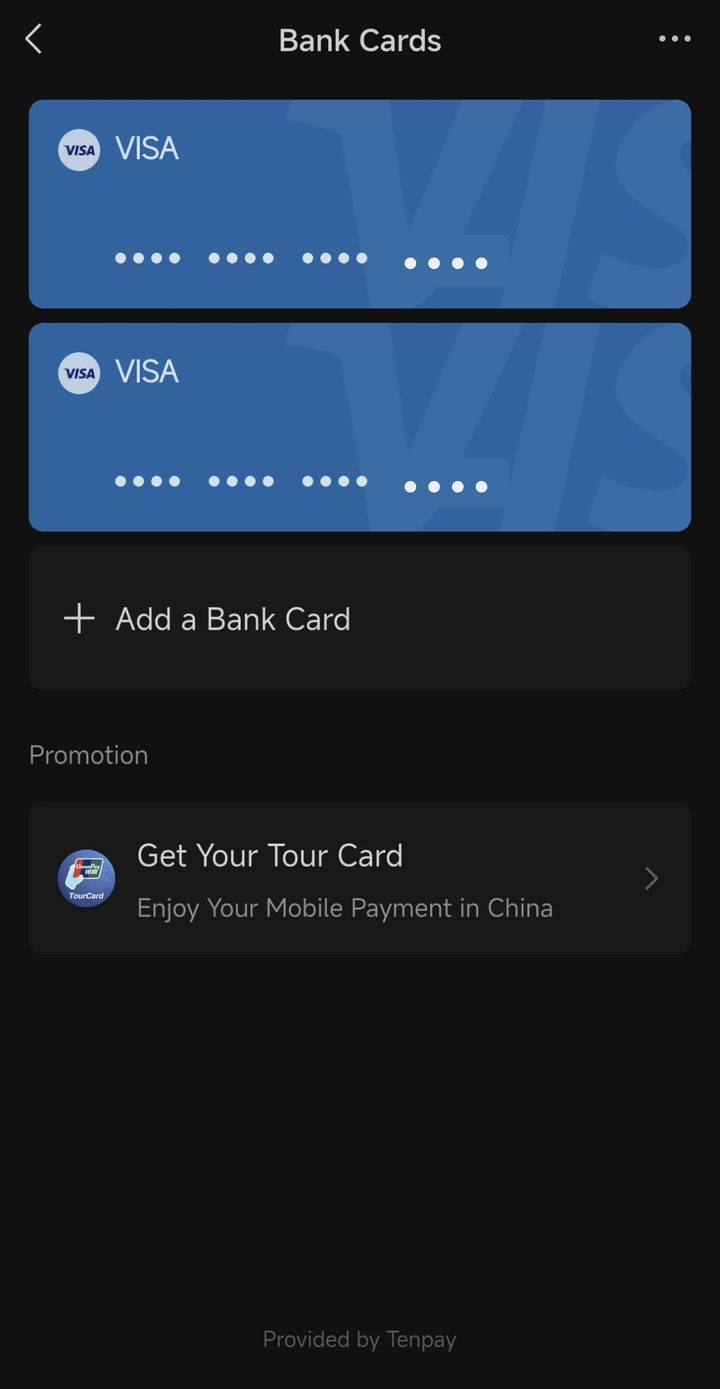
Bank Cards, after: the new Visa card is listed. Screenshots from my own phone, with my personal details hidden. Tap a picture to open it larger.